
Keeping CCH Axcess and Karbon in Sync: 5 Problems a Single New Client Form Solves
Steven Duc Tran, CPA, CIA · · Updated October 11, 2026
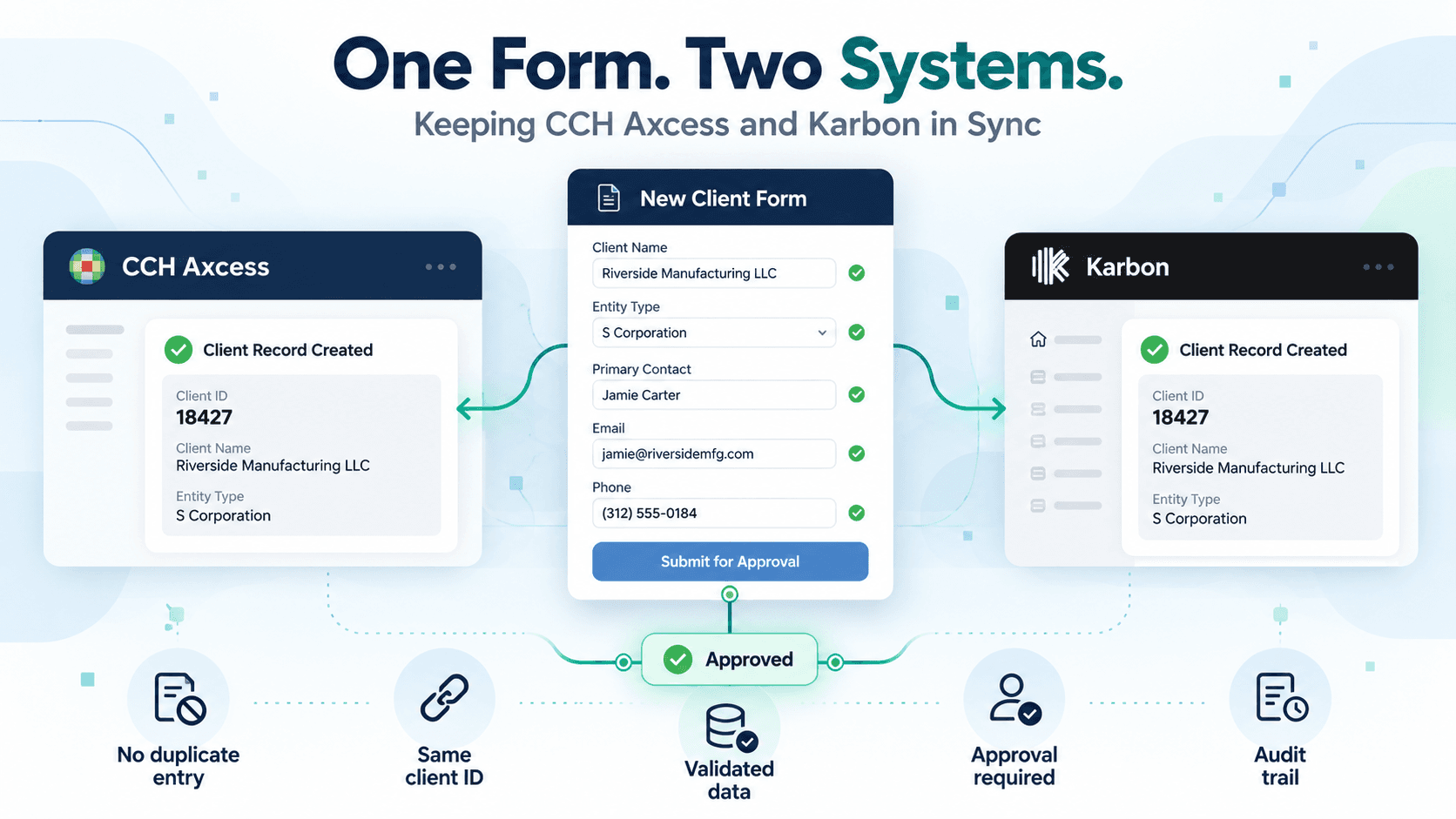
Many CPA firms run tax in CCH Axcess and practice management in Karbon. Today, the two systems do not share client records. Every new client has to be set up in both, often by different people, at different times, with no common check on the data.
That gap creates the same problems in most firms: duplicate data entry, conflicting client IDs, incomplete information, and no clear record of who approved the client. The question is how to keep both systems accurate without adding staff time or another manual review step.
We recently built a client management tool for a CPA firm to solve this. Staff enter a new client once, on one form. The form validates the data, routes it for approval, and then creates the client in both systems.
The same tool also handles the harder job: changing a client that already exists in both.
How do you keep CCH Axcess and Karbon in sync for new clients?
Enter each new client once, on one form, and let the form write to both systems. The form validates the data, assigns one client ID, and sends the request to an approver. After approval, it creates the client in CCH Axcess and in Karbon through each vendor's API (application programming interface). The ID is the same in both.
Our build uses the CCH Axcess Open Integration APIs and the Karbon API to write directly to each system, with no export, import, or re-keying in between. Every new client follows the same four steps:
- A staff member fills in the form. It proposes a client ID and checks each entry.
- When every check passes, they submit, and the request goes to a designated approver.
- On approval, the tool creates the client in CCH Axcess and in Karbon.
- It adds a note to both records naming who requested the client and who approved it.
The five-minute demo below covers both creating a client and updating one.
That one process addresses five problems:
| Problem | What the new client form does |
|---|---|
| 1. Duplicate data entry | Collects each field once and writes it to both CCH Axcess and Karbon. |
| 2. Conflicting or duplicate client IDs | Proposes the next available 5-digit Client ID, confirms the ClientID.SubID is unused, and writes the same ID to both systems. |
| 3. Incomplete or invalid data | Checks eight required items and keeps the Submit button disabled until all of them pass. |
| 4. No approval control | Routes every request to a designated approver. Nothing is written until it is approved. |
| 5. No audit trail | Adds a note in both systems with the submitter, the approver, the date, and the client ID. |
1. Duplicate data entry in CCH Axcess and Karbon
Staff type the same name, address, phone number, and email into CCH Axcess, then again into Karbon. Every field typed twice is a chance for the two records to disagree.
Re-keying between tools is common. Financial Cents surveyed 261 bookkeeping firms for its 2026 Bookkeeping Firm Tech Stack Report. Of those firms, 70% said they manually re-enter data between tools at least a few times per week. Wolters Kluwer lists syncing client data with another system among the common uses of the CCH Axcess APIs for the same reason.
The form collects each field once and writes it to both systems. For example, Organization Name goes to Name Line 1 in CCH Axcess and to Organization Name in Karbon. The billing email becomes the CCH Axcess billing email and the primary email in Karbon.
The two systems also structure a client differently. Karbon's API has three client entity types: Contacts, Organizations, and Client Groups. The tool keeps Karbon's organization-and-person structure. The mapping is decided once, when the form is built, not by whoever happens to be doing the entry that day.
2. Conflicting or duplicate client IDs
When IDs are assigned by hand, two clients can end up sharing an ID, or one client can carry a different ID in each system.
The second case is the harder one to live with. Anything that later connects the two systems has to match clients somehow, and the client ID is the usual key. In the time entry sync we built between Financial Cents and CCH Axcess, for instance, clients match by ID. A client with two IDs does not match.
The form proposes the next available 5-digit Client ID and confirms the full ClientID.SubID is unused before the client can be submitted. The same identifier is then written to both systems.
3. Incomplete or invalid client data
Missing partner assignments, mistyped emails, and partial addresses usually come to light later, when an invoice bounces or work is assigned to the wrong partner.
The form checks eight required items before submission, including billing email format, phone format, physical address, office, and partner and administrator assignment. The Submit button stays disabled until every check passes.
A warning can be clicked through on a busy day. A disabled button cannot.
4. No approval before a client is created
In many firms, anyone with access can create a client, and no one reviews the record before it goes live. Most CPAs would flag that in a client's process. It is easy to miss in your own.
The form sends each submission to a designated approver, and nothing is written to CCH Axcess or Karbon until it is approved. Staff can follow each request from Waiting for Approver to Processing to Success.
A failure is visible too. It raises a notification and shows on the request's status record, so nothing fails silently.
5. No audit trail for new clients
When questions come up later, there is often no record of who requested the client or who approved it.
After approval, the tool adds a note in both CCH Axcess and Karbon recording the submitter, the approver, the date, and the client ID. The record sits on the client itself, in the two systems staff already open, so nobody has to go looking for a separate log.
Client record updates: the harder case
Creating a client is the easier of the two jobs. It happens once, and it starts from a blank record. Updating is harder. A client's address, billing email, or partner can change many times over the years, and every change has to reach both systems.
It is also where records tend to drift. A change gets made in CCH Axcess and never reaches Karbon, or the other way round. By the time anyone notices, there are two versions of the client and no easy way to tell which one is right.
The same tool handles updates. For an existing client, the form shows each field from CCH Axcess and from Karbon side by side, so a mismatch is visible before anything changes. A change is applied only after someone approves it, the same control a new client goes through.
So the five problems above stay solved for as long as the firm has the client, not only on the day the client is set up.
Does Karbon integrate with CCH Axcess?
Not natively, as of October 2026. Karbon's integrations page lists a CCH Axcess integration for syncing clients, marked "Coming soon." Until it is available, a new client has to be created in each system separately, either by hand or through the two vendors' APIs.
A native sync should help with the first problem on this list, the double entry. The listing does not say how it will handle the other four. When it ships, check it against the same questions: who assigns the client ID, what gets validated, who approves, and where the record of that approval lives.
Moving the data is the easier half. The controls around it are the firm's to design.
Planning considerations
The form enforces rules. The firm still has to write them. Before a build like this, settle these first:
- Approval authority. One named approver, and a backup for the weeks that person is out.
- Client ID convention. How your firm uses the 5-digit Client ID and the Sub-ID. Decide when a related entity gets a new Sub-ID instead of a new Client ID.
- Required fields. This firm's form runs eight checks. Your list may differ, and it is easier to agree on it before go-live than after.
- API licensing and access. Karbon publishes its API documentation. Wolters Kluwer licenses the CCH Axcess Open Integration APIs as kits: Common, Tax, Engagement, Firm Management, and Workflow. Confirm which kits your firm holds before anyone scopes the work. If a vendor does the build, ask about a Designated Vendor Integrator Key, so the vendor works under its own credential.
- Reconciliation of existing records. The side-by-side comparison shows where existing records disagree. Someone at the firm still has to decide which value is right, so agree on which system wins for each field before the cleanup starts.
Outcomes for the firm
The result is one controlled process for creating and changing clients, and two systems that agree from day one and stay that way.
In practice, that means:
- Single point of entry. Client data is entered once, whether the client is new or changing.
- Single client view. Staff see both records on one screen instead of cross-referencing CCH Axcess and Karbon by hand.
- Approval controls and audit trail. Nothing reaches either system without an approver, and each new client carries a note saying who requested it and who approved it.
- Firm-specific configuration. It keeps the firm's 5-digit client IDs and Karbon's contact structure. It runs on the firm's own server, behind the firm's Microsoft 365 sign-in.
The tool is live in production at the firm.
Internal controls by design
I am a CPA and a Certified Internal Auditor, and I worked inside CPA firms before I built software for them. That is why this tool does more than move data. It validates before entry, requires approval before anything is written, and leaves a record of who did what.
I plan a build like this the way an auditor plans an engagement: start with the firm's process, find where it can go wrong, test on a sample, and leave an audit trail.
Questions firms ask
Can one form create a new client in both CCH Axcess and Karbon?
Yes. In the tool we built, staff enter the client once, the form validates the data, and a designated approver reviews the request. Only after approval is the client created in CCH Axcess and Karbon, with the same client ID in both.
Can the same tool update an existing client in CCH Axcess and Karbon?
Yes. For an existing client, the form shows each field from CCH Axcess and from Karbon side by side, so a mismatch is visible before anything changes. A change is applied only after someone approves it, the same control a new client goes through.
How do you prevent duplicate client IDs between CCH Axcess and Karbon?
Stop assigning IDs by hand. The form proposes the next available 5-digit Client ID, confirms the full ClientID.SubID is unused before the client can be submitted, and writes the same identifier to both systems.
What does a firm need to connect CCH Axcess and Karbon?
API access on both sides, and a few decisions. Wolters Kluwer licenses the CCH Axcess Open Integration APIs as kits, and Karbon publishes its API documentation. The firm also needs a named approver, a rule for assigning client IDs, and an agreed list of required fields.
If your firm still sets up clients twice
If your firm runs CCH Axcess and Karbon and still sets up clients twice, or changes them in one system and not the other, this approach may fit your setup. On a discovery call, we can walk through how your firm creates and changes a client today, and where the two records drift apart.
More of what we build is on the Karbon and CCH Axcess pages.
Steven Duc Tran, CPA, CIA, worked inside CPA firms for five years and has consulted on accounting-firm technology since 2017. More about Silver Sea.
- CCH Axcess
- Karbon
- Client intake
- API integration
- Data quality