
Most firms use a fraction of what the Axcess suite already holds. We build the integrations, automations, and dashboards that turn that data into work getting done.
Onboarding, data entry, document chasing, and e-file tracking done by hand, every return, every year.
See how we helpInvoices re-keyed, AR chased manually, and client records that drifted apart years ago.
See how we helpWorkstream, documents, and client records that have to move without a lost weekend or a lost file.
See how we helpThe data is in Axcess. Getting it in front of partners as decisions, WIP against budget, profitability by client and industry, is the missing piece.
See how we helpThe Axcess suite already holds the client, the return, and the document. We connect them so staff review exceptions instead of typing.
Case studies from this stage
Most billing problems in Axcess are data problems first. We fix both ends.
Case studies from this stage
A firm can own Tax and not Document, so an integration has to check what the firm licenses before it assumes a feature is there.
A modern one and a legacy one, and which calls accept which isn't obvious until you have built against both.
Everything is built and tested against the firm's live database, which is why we test on a sample first and keep a trail of every change.
We map the structure, test on a sample, and keep both systems running until staff are ready, so there is no cutover day to dread.
Case studies from this stage
Everything below runs on the Axcess data you already have.
Case studies from this stage
Built on the CCH Axcess data you already have. Deployed in as little as two weeks.
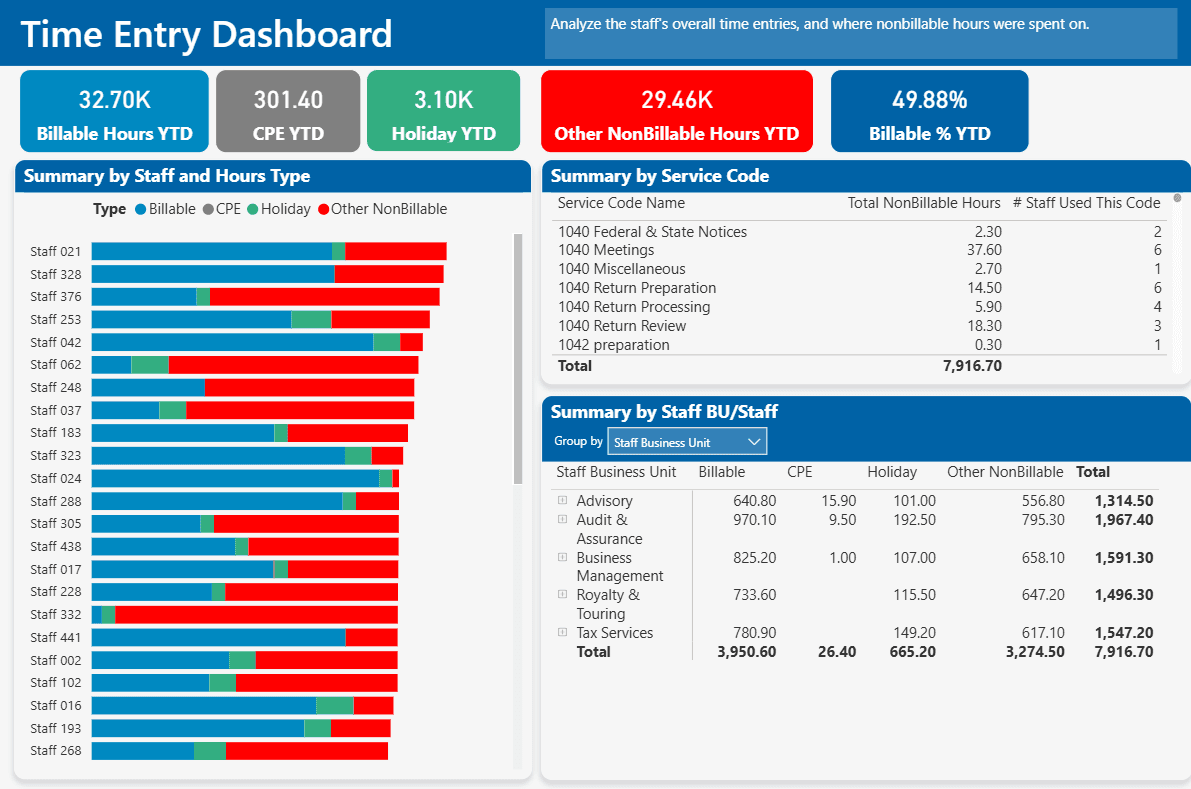
Where every hour goes, in one view
Staff time across billable, CPE, holiday, and non-billable categories, so leadership can see where capacity is being absorbed.
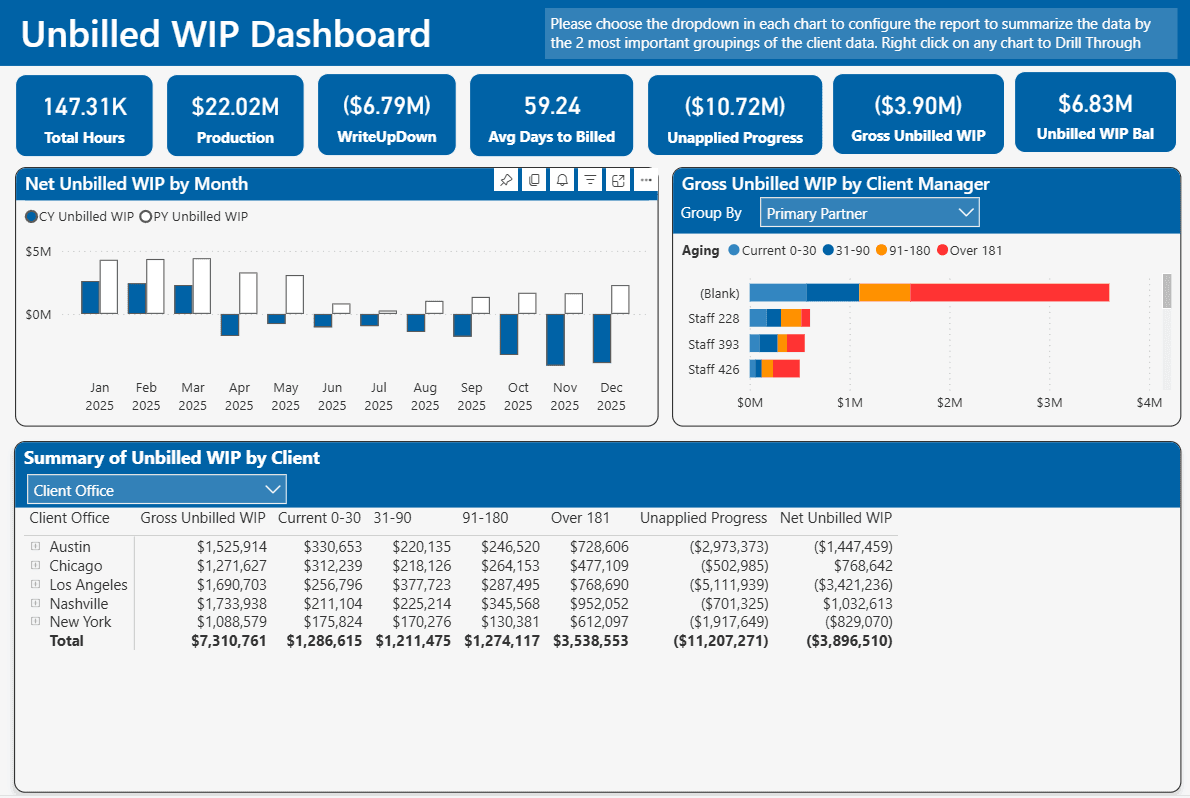
Aged, and still actionable
Unbilled work aging by partner before it turns into a write-off, broken out current, 31 to 90, 91 to 180, and past 181 days.
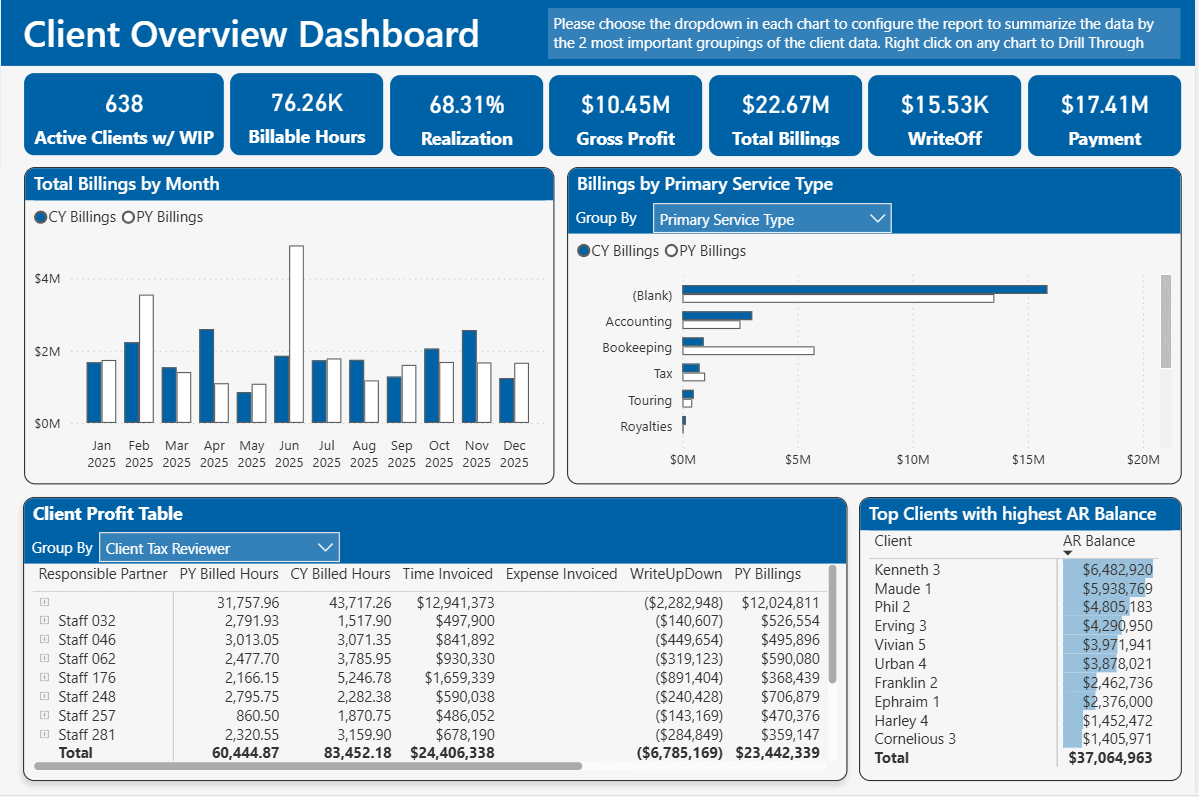
Performance, client by client
Profitability, billing trends, and AR exposure at client level. Slice by office, service type, or responsible partner.
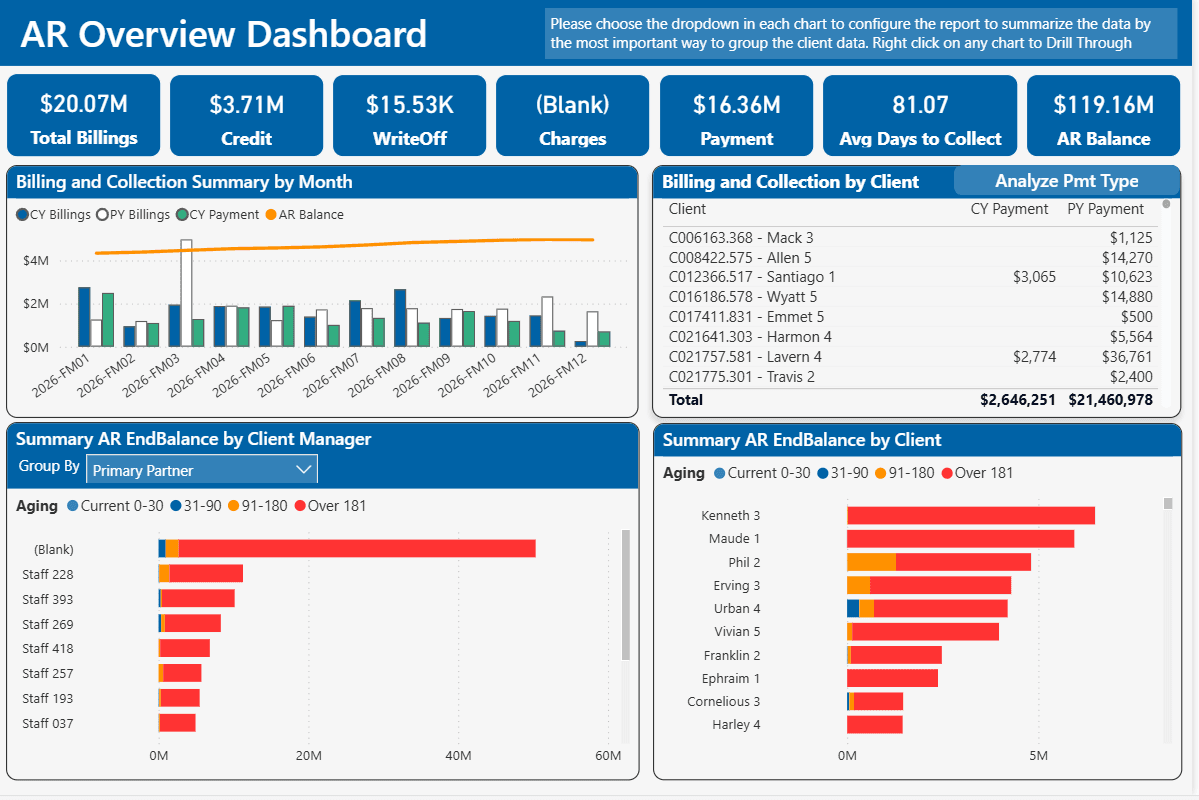
Collections, Aged And Segmented
The full receivable pipeline from billing to collection, with aging breakdowns by client, manager, and payment type.
No. CCH Axcess does not offer a sandbox, so every integration is built and tested against the firm's live database. We test on a small sample of records first, keep a log of every change, and only then run at full volume.
Yes, but it doesn't cover everything. Client, tax, and document data are available through the API. Some functions, including time entry import in CCH Axcess Practice, have no API at all. For those we use a bot that works through the same screens your staff use.
It is a separate API credential for outside developers, announced by Wolters Kluwer in September 2026. Before it, a vendor had to use the same key as the rest of the firm. A dedicated key lets the firm identify, authorize, and govern each integration separately.
Yes. We run a one-time bulk migration that keeps folder structure and metadata, skips documents past the retention period unless they are marked permanent, and then keep new files in sync through the API. Staff can keep working in CCH Axcess while the firm adopts SharePoint at its own pace.
Yes. We have built this for Financial Cents at two firms. Time entries cross every day. Each staff member reviews their own entries first, and then a bot imports them. Billing, WIP, and realization stay in CCH Axcess without anyone re-keying.
Usually not out of the box. CCH Axcess has few ready-made integrations compared with newer platforms such as Karbon, which were designed from the start to connect to other software. For planning, assume a connection will have to be built rather than switched on, and budget for it.
Usually yes. The data sits in a solid database, so a custom report is typically a quick turnaround. The built-in client reports are limited: a standard client list gives the ID, the name, and one email address. Every email, full mailing addresses, and other detail in one place takes a custom report. Project and workflow reporting is stronger.
It is an add-on that copies your CCH Axcess data into a database, which makes extracting and reporting on it far easier. With it, most data questions are straightforward. Without it, some data is still reachable but several things get much harder, so it is one of the first things to establish on any CCH data project.
Question it before carrying it forward. These schemes were often designed when the firm was much smaller, and the ranges get stretched as the firm grows. Ask whether it still helps you manage the client list or is followed out of habit. If you keep it, have the system assign the number, because a manual step there cascades into everything downstream.

Book a free call. We'll review your setup and find the highest-ROI starting point for your firm.