PDF-XChange PRO vs Adobe Acrobat for CPA Firms: Keep the Features You Use, Cut the Renewal by 90%
Steven Duc Tran, CPA, CIA ·
Once the October 15 extension deadline passes, a different conversation takes the spotlight: software renewals. Tax, workflow, portal, e-signature, document management and PDF tools each come with their own per-seat subscription and their own renewal date.
Most vendors have moved firms off perpetual licenses, so "total cost of ownership" is now closer to a total cost of renting. Each subscription looks reasonable alone. Added together, they become one of the larger lines in the budget. Firms that evaluate each renewal, instead of taking every vendor for granted, often find real savings. The PDF editor is one of the easiest places to start.
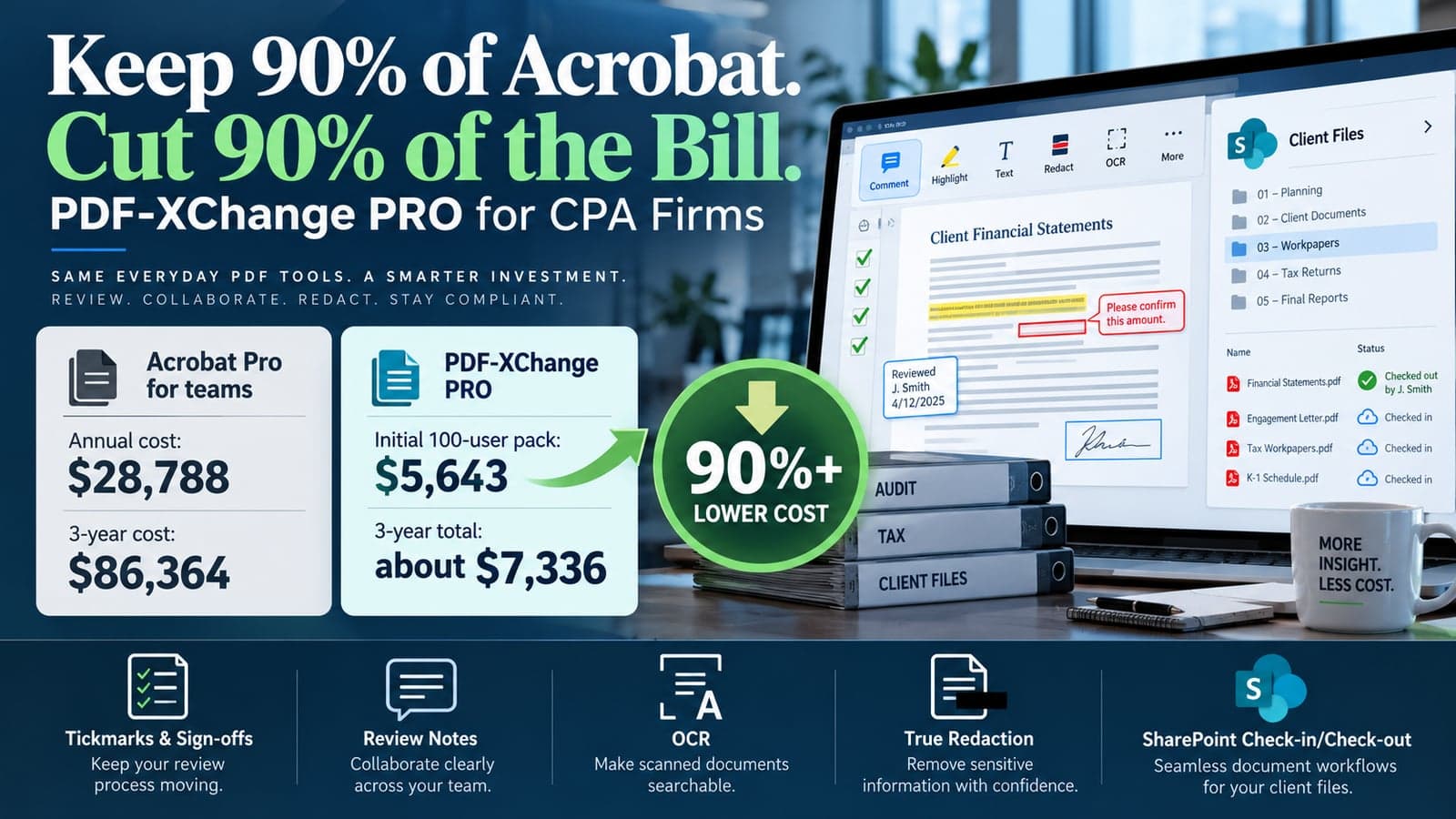
Short answer: For a CPA firm that runs on Windows and stores documents in SharePoint, PDF-XChange PRO covers the PDF work staff do every day: tickmarks, review notes, OCR, redaction and SharePoint check-out. A 100-person firm pays about $7,336 over three years for PDF-XChange PRO, compared with $86,364 for Acrobat Pro for teams. That is more than 90% less.
What Acrobat costs a CPA firm every year
Adobe lists Acrobat Pro for teams at $23.99 per user per month on annual billing. That is $287.88 per seat per year, and it renews every year for every person who touches a PDF.
At a 100-person firm, the line item is $28,788 a year. Nobody approves that number once. It just renews, and it grows every time the firm hires.
Most firms treat this as a software budget question. The better question is operational: which Acrobat features do your preparers, reviewers and admins actually use during a return or an engagement?
What is PDF-XChange PRO?
PDF-XChange PRO is a Windows PDF suite sold as a perpetual license. It bundles three products: PDF-XChange Editor Plus for markup and editing, PDF-Tools for batch processing, and the PDF-XChange Standard virtual printer. The PRO edition is the only one that includes the advanced SharePoint integration, which lets staff open files in the desktop editor directly from a SharePoint Online library.
The license includes one year of maintenance. If you stop renewing maintenance, the software keeps working on the versions released while maintenance was active.
Cost comparison: PDF-XChange PRO vs Acrobat Pro for teams
The table below uses US list prices as of October 2026. Acrobat Pro for teams is $23.99 per user per month on annual billing. PDF-XChange PRO uses the published user-pack price plus two additional years of maintenance bought at purchase.
| Firm size | Acrobat Pro for teams, 3 years | PDF-XChange PRO, 3 years | Savings |
|---|---|---|---|
| 25 users | $21,591 | $3,120 | About 86% |
| 50 users | $43,182 | $5,617 | About 87% |
| 100 users | $86,364 | $7,336 | About 92% |
For a 100-person firm, year one alone costs $5,643 for PDF-XChange PRO versus $28,788 for Acrobat, about 80% less. The gap widens after year one, because the license is already paid for and only maintenance renews. Volume quotes and Adobe promotions will move these numbers, so price your own seat count before you decide.
Which Acrobat features carry over for CPA work
PDF-XChange PRO covers the five PDF workflows we see most often in tax and assurance teams.
1. Tickmarks and sign-offs
Custom and dynamic stamps let you build a reusable tickmark library (agreed, footed, variance, PBC received). Sign-off stamps fill in initials and the date automatically, or open a pop-up for procedure, conclusion and workpaper reference.
2. Review notes by role
Saved comment styles give preparers, reviewers and partners their own colors and formats. The comments pane lists every open note in one place, so open items get cleared before sign-off or e-file.
3. OCR on client source documents
Searchable OCR makes scanned W-2s, 1099s, K-1s and bank statements searchable without changing the original image. PDF-Tools runs OCR on a full folder of client scans at once.
4. Redaction that actually deletes
Find and Redact locates SSNs, account numbers, phone numbers and custom patterns, then removes them from the file rather than covering them with a black box. Sanitize Document strips metadata, hidden text and comments before a file leaves the firm.
5. SharePoint check-out and check-in
PRO opens a file straight from a SharePoint library and saves it back with no local copy. A checked-out file can't be overwritten by a second reviewer while the first one is still working.
Beyond those five, PRO also handles combining and splitting client uploads, bookmarks, Bates numbering for IRS exam responses, document comparison between prior-year and current-year files, fillable organizers, passwords and watermarks.
Why SharePoint integration is the deciding feature
The fifth point matters most for firms that have left GoFileRoom or another legacy document system for SharePoint.
We have moved CPA firms onto SharePoint, including one migration of 1.2 million documents for about 11,000 clients. In the first week after cutover, staff ask the same question: how do I mark up a workpaper without downloading it first? Downloaded copies drift from the library version, and two reviewers end up editing different files.
PDF-XChange PRO answers that inside the library the firm already uses. Check-out locks the file, edits save back to SharePoint, and there is no local copy left on someone's desktop.
What you give up by switching from Acrobat
A fair comparison has to include the gaps. These are the ones that matter for CPA firms:
- Windows only. Staff on Mac need a different tool.
- No browser-tab editing. Files opened inside a portal or web app use that app's own viewer.
- No TicTie Calculate. The tick-and-tie plug-in many firms use runs inside Acrobat Standard or Pro. Stamps, saved styles and links cover most of that need, but not all of it.
- No bundled e-signature service. Acrobat Pro includes e-signature. Most firms already send 8879s and engagement letters through SafeSend or a client portal, so this may already be covered.
If a team depends on any of these daily, keep a small number of Acrobat seats for that team and move everyone else.
If your firm wants help planning its technology stack before next tax season, book a discovery call.
Frequently asked questions
Is PDF-XChange PRO a good Adobe Acrobat alternative for CPA firms?
Yes, for firms on Windows that store documents in SharePoint. It covers tickmarks, review notes, OCR, redaction, Bates numbering and SharePoint check-out at a fraction of Acrobat's per-seat subscription cost. Firms that rely on Mac, browser-based editing or Acrobat tick-and-tie plug-ins such as TicTie Calculate should keep some Acrobat seats.
How much does PDF-XChange PRO cost compared with Acrobat Pro?
As of October 2026, a single PDF-XChange PRO license lists at $131 and a 100-user pack at $5,643, each with one year of maintenance. Acrobat Pro for teams lists at $23.99 per user per month, or $287.88 per user per year.
Does PDF-XChange PRO work with SharePoint?
Yes. The PRO edition is the only PDF-XChange edition with the advanced SharePoint integration. Staff can open a file in the desktop editor from a SharePoint library, check it out, and save edits back without creating a local copy.
What happens if we stop paying for PDF-XChange maintenance?
The license stays valid. You keep using any version released while maintenance was active, but you stop receiving new versions and updates until you renew.
Does PDF-XChange PRO replace e-signature for tax returns?
No. It supports digital signatures for internal approvals and sign-offs, but it is not an e-signature service for client 8879s. Most firms already handle that through SafeSend or a client portal.
Steven Duc Tran, CPA, CIA, is the founder of Silver Sea AI & Automation. Silver Sea builds integrations, automation and Power BI dashboards for US CPA firms with 10 to 300 staff.
- SharePoint
- Technology strategy
- Microsoft 365